Tufte's Six Principles for Graphical Integrity
Edward Tufte's principles of graphical integrity have defined the gold standard for data visualization for over four decades. His work transformed how we think about presenting information - shifting focus from decoration to truth-telling.
This guide breaks down each of Tufte's six principles with practical examples, showing how these concepts apply to modern chart design.
The Six Principles:
Who is Edward Tufte?

Edward Tufte is a statistician and professor emeritus at Yale University, often called the "Leonardo da Vinci of data."1 His 1983 book The Visual Display of Quantitative Information revolutionized how designers, journalists, and analysts think about presenting data.2
Tufte's core argument is simple but radical: graphical excellence is not about style - it's about truth.3 A chart should maximize the information conveyed while minimizing visual noise. Every pixel of ink should serve the data.
His influence extends far beyond academia. The Financial Times, The Economist, Bloomberg, and top consulting firms like McKinsey all build on his foundation.4 Their charts command attention because they follow these principles - treating data visualization as a form of intellectual honesty rather than mere decoration.
Edward R. Tufte
Professor Emeritus, Yale University
© Andrei Severny
The Data-Ink Ratio5
Data-Ink Ratio = Data-Ink / Total Ink Used
A ratio of 1.0 means every drop of ink represents data. While this ideal is rarely achievable, Tufte argues designers should maximize this ratio by erasing non-data-ink (borders, backgrounds, unnecessary gridlines) and redundant data-ink (duplicate labels).4
"Above all else, show the data." - Edward Tufte
1. Show Data in Comparison
An isolated number is meaningless. Authority and insight come from context - showing how one value relates to others. The fundamental analytical question is always: "Compared to what?"6 Comparisons reveal differences, trends, and anomalies that single data points cannot show. Whether comparing across time periods, geographic regions, or different categories, juxtaposition creates meaning.
Weak: Isolated Data
A single number provides no context. Without comparison points, we cannot evaluate whether $4.2M represents success, failure, growth, or decline.
Strong: Comparative Data
Multiple data points reveal the story: steady growth over 3 years with 35.5% total increase. The visualization instantly communicates performance and trajectory.
Fair Comparisons: The Lie Factor
But comparisons must be fair. Visual representations should accurately reflect the underlying data relationships. Tufte quantified this principle with his Lie Factor - a mathematical measure of how much a graphic deviates from numerical reality:7
Lie Factor = (Size of effect in graphic) / (Size of effect in data)
A Lie Factor of 1.0 indicates an honest graphic. Values between 0.95 and 1.05 are acceptable.
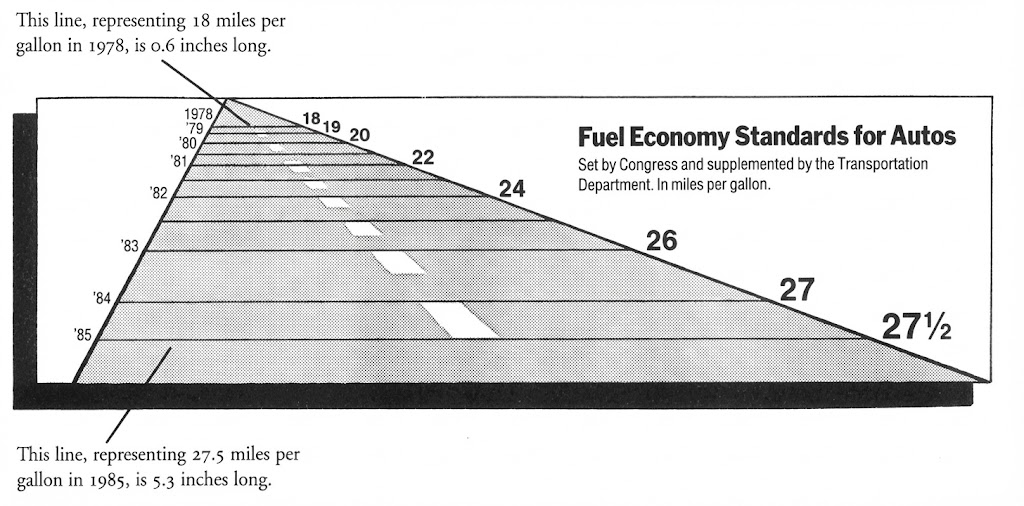
Case Study 1: Fuel Economy Standards - A Perspective Distortion
In 1978, The New York Times published a graphic showing fuel economy standards with severe perspective distortion, creating what Tufte called a "whopping lie."8
Common sources of high Lie Factors include: using area to represent one-dimensional data (creates a squared effect), truncating the y-axis to exaggerate differences, and applying perspective that distorts relative sizes.
Case Study 2: The Broken Y-Axis Deception
Breaking the y-axis is a common technique to exaggerate small differences. By truncating the baseline, minor variations appear dramatic.9
Common sources of high Lie Factors include: using area to represent one-dimensional data (creates a squared effect), truncating the y-axis to exaggerate differences, and applying perspective that distorts relative sizes.
2. Demonstrate Causality
The best charts don't just show correlation - they suggest mechanism. They help viewers understand why something happened, not just that it happened. Tufte argues that effective graphics should reveal causality, mechanism, explanation, and systematic structure.
Weak: Cause Unclear
Data changes without explanation leave viewers guessing about underlying factors. The narrative is incomplete without causal markers.
Strong: Cause Marked
Annotating when and why changes occurred provides crucial context. The 58% improvement after launch becomes a clear success story.
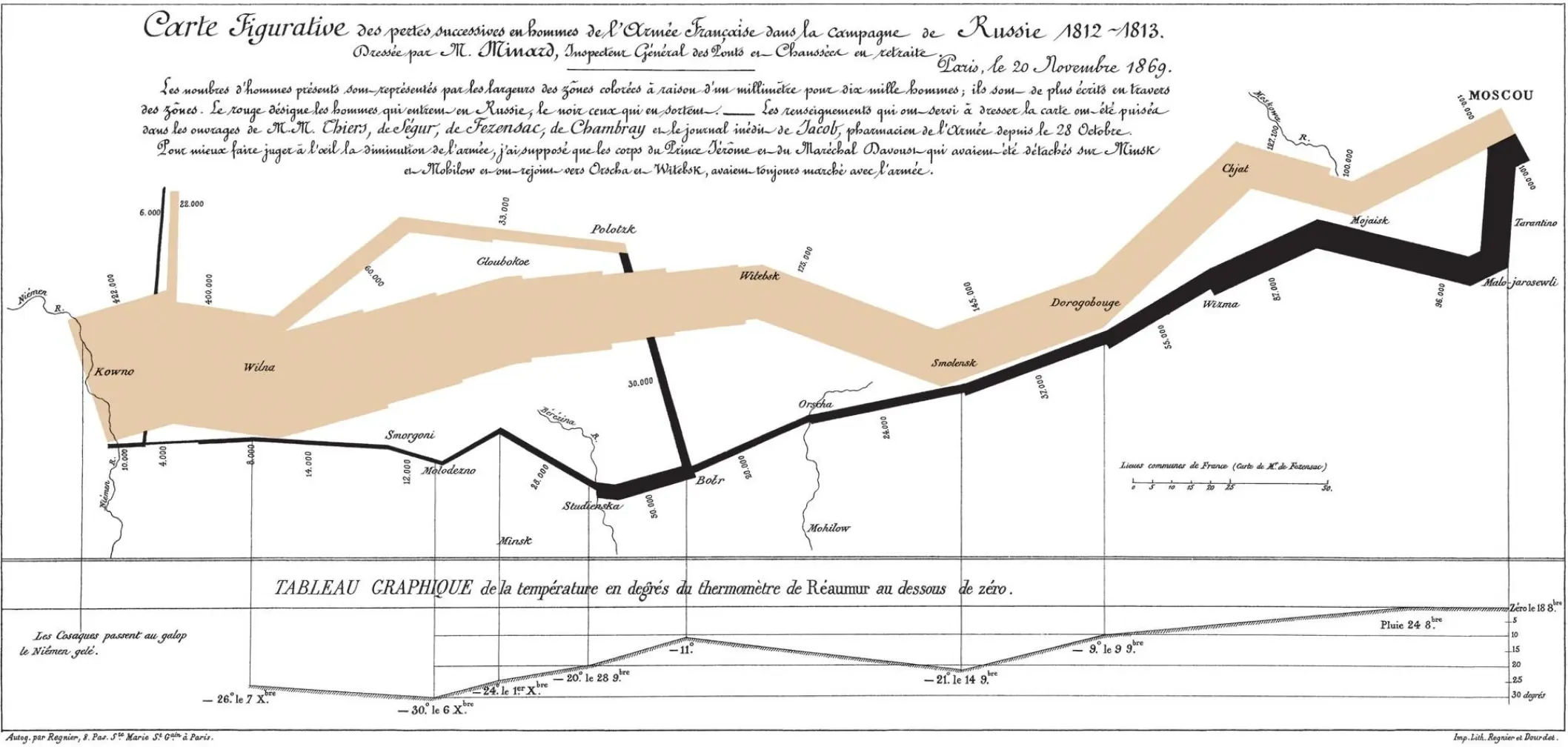
Case Study: Minard's Map - The Gold Standard of Causal Visualization
Tufte called this "probably the best statistical graphic ever drawn."10 Charles Joseph Minard's 1869 map masterfully reveals why Napoleon's Grande Armée was destroyed, not just what happened.
How Minard Shows Causality:
-
•
Army Size (Width): The tan band's width shows 422,000 men advancing to Moscow; the black band shows only 10,000 returning - a visual representation of catastrophic losses that needs no explanation.
-
•
Geographic Path (Position): The army's route is mapped precisely across European geography, showing exactly where losses occurred. The devastating crossing of the Berezina River becomes immediately apparent.
-
•
Temperature Timeline (Lower Chart): The temperature graph below links specific dates to temperatures, plunging to -30°C (-22°F). When aligned with the geographic positions above, it reveals winter as the primary killer - not enemy combat.
-
•
Direction (Color): Tan for the advance, black for the retreat - the color change marks the turning point at Moscow, where victory turned to disaster.
Why This Is Genius: Minard doesn't tell you what caused the disaster - the graphic reveals it. The temperature line transforms a map of movements into an explanation of death. When you see the army's width shrink dramatically as temperatures plummet, causation becomes self-evident.
This exemplifies Tufte's principle perfectly: by integrating multiple variables in precise registration, causes emerge naturally from the data itself. The viewer discovers that the army was destroyed not by Russian military might, but by General Winter - a truth more powerful because you see it rather than being told it.
"Six variables are plotted: the size of the army, its location on a two-dimensional surface, direction of the army's movement, and temperature on various dates during the retreat from Moscow... It tells a rich, coherent story with its multivariate data, far more enlightening than just a single number bouncing along over time." - Edward Tufte11
Modern examples like waterfall charts follow this principle - they show how you got from Point A to Point B through a sequence of contributing factors, making the mechanism visible.
3. Show Multivariate Data
The real world is complex. Oversimplified single-variable charts can mislead. Authoritative visualizations embrace complexity by showing how multiple variables interact.
Weak: Single Variable
Simple bar charts show only one dimension, missing the rich relationships between different data attributes.
Strong: Multiple Variables
Encoding time, revenue, region, and units sold in a single view reveals patterns impossible to see in isolation.
4. Integrate Evidence
Text, numbers, and graphics should work together seamlessly. The viewer shouldn't have to shuttle between a legend, a chart, and a separate text block to understand the message.
Weak: Segregated Legend
Separate legend boxes force viewers' eyes to jump between data and labels, breaking the flow of information.
Strong: Integrated Labels
Direct labeling creates immediate understanding. No cognitive effort wasted matching colors to legend entries.
5. Document Everything
Credibility requires attribution. Every chart should clearly state its source, the time period covered, and any important caveats about the data.
Weak: No Attribution
Unattributed data lacks credibility. Viewers cannot verify claims or understand the context of measurements.
Strong: Full Documentation
Complete attribution with sources, dates, and methodology builds trust and enables verification.
6. Content Above All
The design must serve the content, not the designer. "Chartjunk" - decorative elements that add no informational value - undermines authority by signaling that the data alone isn't compelling enough.
Weak: Chartjunk
3D effects, shadows, gradients, and excessive gridlines obscure the data. Visual decoration dominates information.
Strong: Data-Focused
Every pixel serves a purpose. Clean presentation lets the data speak clearly without unnecessary embellishment.
The Duck and Other Chartjunk
Tufte coined the term "The Duck" for graphics that sacrifice information clarity for artistic design - where the visual metaphor overwhelms the data. Named after a Long Island duck-shaped store, these charts prioritize form over function.12
Common Chartjunk to Avoid:
- 3D effects: They distort perception and make accurate value reading impossible
- Excessive gridlines: Heavy grids compete with the data for visual attention
- Decorative backgrounds: Gradient fills, textures, and images behind data create noise
- Redundant encoding: Using both color AND pattern AND labels to show the same thing
Applying These Principles
Tufte's principles aren't about making charts boring - they're about making them trustworthy. Here's a quick checklist for your next visualization:
Before You Publish:
- ☐ Is the data shown in meaningful comparison to something?
- ☐ Does the design help explain why, not just what?
- ☐ Have I shown the relevant complexity, or oversimplified?
- ☐ Are labels integrated directly into the chart?
- ☐ Is the source clearly documented?
- ☐ Could I remove any element without losing information?
Final Thoughts
Tufte's influence extends far beyond academia. The Financial Times, The Economist, and top consulting firms all build on his foundation. Their charts work because they follow these principles - not as rigid rules, but as a mindset that prioritizes truth over decoration.
The goal isn't minimalism for its own sake. It's clarity. Every design decision should answer one question: Does this help the viewer understand the data better?
References
- New York Times, "The Da Vinci of Data" - Profile of Edward Tufte
- Tufte, E. (1983). The Visual Display of Quantitative Information. Graphics Press.
- Tufte, E. (1990). Envisioning Information. Graphics Press.
- Tufte, E. (1997). Visual Explanations. Graphics Press.
- Tufte, E. (1983). The Visual Display of Quantitative Information, Chapter 4: "Data-Ink and Graphical Redesign"
- Tufte, E. (2006). Beautiful Evidence. Graphics Press. p. 127
- Tufte, E. (1983). The Visual Display of Quantitative Information, p. 57
- Tufte, E. (1983). The Visual Display of Quantitative Information, p. 57-60
- Huff, D. (1954). How to Lie with Statistics. W. W. Norton & Company.
- Tufte, E. (1983). The Visual Display of Quantitative Information, p. 40
- Tufte, E. (2006). Beautiful Evidence. Graphics Press. pp. 122-139
- Tufte, E. (1990). Envisioning Information, Chapter on "Chartjunk"
Create Tufte-Inspired Charts in Google Slides
Build clean, professional charts that follow Tufte's principles - with direct labeling, minimal gridlines, and sophisticated styling.